

Create Cover Page for Book Report
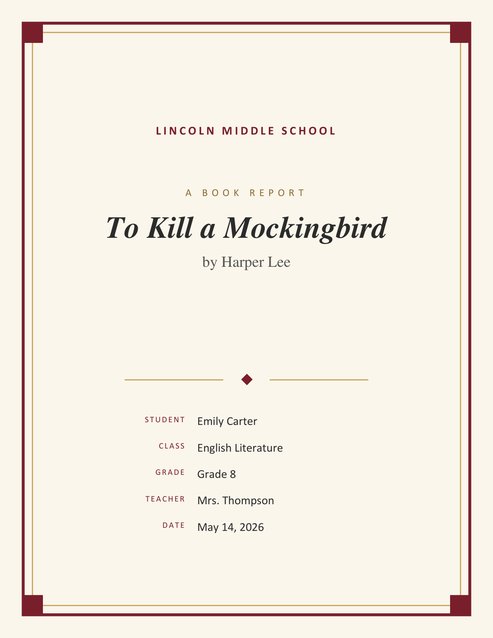
Make your book report look finished before the first sentence. Enter the book title, author, your name, class and teacher, and download a classic, print-ready PDF cover page in seconds.
It suits school book reports, reading logs and literature assignments from elementary to high school. Unsure how the finished page will look? One click on Load sample data drops in an example report that you can overwrite line by line.
Fill in the information below
Other Similar Templates
Some other templates similar to this one are also available here. If you would like to create your COVER PAGE using one of these templates, visit the following.




Create a book report cover page online
A book report is your chance to show what you read and what you thought about it, and a good cover page sets the tone before your teacher reads a single line. A neat cover tells your reader that you took the assignment seriously. It is also how a teacher tells one report from the next: the cover shows which book was read, who wrote the report, for which class and on what day, so nothing gets lost in a pile of papers.
Here you can make that page in a minute or two. Type the details, look over the result and save it as a PDF to print. The look is deliberately bookish — a warm cream page, a double frame and a centred title — so it suits any novel, biography, non-fiction book or short story collection.
From blank form to finished cover
Start with the book. Type its exact title and the author’s name, because those two lines are what your teacher will look at first. Next add your own information: your name, the class, your grade, the teacher and the date. Your school’s name and logo, if you add them, sit at the top of the page.
The little line above the title is yours to change. It reads “A Book Report” until you replace it, so a teacher who asks for a “Reading Response” or “Book Review” gets the right label. If you would rather see a finished example before typing anything, the sample button above the form fills in a whole report for you to edit.
When everything looks right, press Preview & Download. Look at the title and the names one last time, then keep the PDF. Print it as the front sheet of your report, or place it ahead of your other pages if you hand in a single file.
What goes on a book report cover page?
Teachers ask for slightly different things, but most book report covers contain the same details. Each one has its own field in the form:
- Book title. Shown in large italic type in the middle of the page. It is the only required field.
- Author. Appears under the title as “by” followed by the author’s name.
- Report heading. A short label above the title that says what kind of paper this is.
- School name and logo. Shown at the top. Useful for schools that want every report to carry the school identity.
- Your name. Use the name your teacher knows you by, as it appears on the class list.
- Class or subject and grade. For example “English Literature” and “Grade 8”. This helps when a teacher marks several classes.
- Teacher. The person who will read and grade the report.
- Date. The date you hand the report in, written in whatever style your class uses.
Tips for a great book report cover
- Follow your teacher’s instructions first. If the assignment sheet says what the cover must include, fill in the form to match it.
- Get the title exactly right. Copy the book title and the author’s name from the book itself, including capital letters and punctuation.
- Keep it simple. A clean cover looks more grown-up than one filled with extra pictures. This design leaves room for your report to do the talking.
- Match the rest of your paper. Use the same name, class and date style on the cover as you use inside the report.
- Print on plain white or cream paper. Slightly warm paper suits the frame design and gives a pleasant finish.
- Proofread once more before printing. A spelling mistake in the title of the book is easy to miss on screen and very noticeable on paper.
Common mistakes to avoid
- Misspelling the author’s name or the title of the book.
- Forgetting to add the class or the teacher’s name, so the report is hard to sort.
- Writing a very long title that runs onto many lines. If the full title is long, use the main title on the cover and mention the rest inside the report.
- Using a logo that is blurry. Upload the clearest version you can find.
- Leaving the date off, which makes late work harder to judge fairly.
Who is this cover page for?
The template is made for students from elementary school through high school who write book reports, reading responses and literature reviews. It also works well for teachers who want every student in a class to hand in work with the same tidy first page, for homeschool families building a reading portfolio, and for book clubs or reading challenges that keep a folder of reports.
Getting a good printout
The page is laid out for US Letter paper, upright, with the frame kept well away from the edge so home and school printers do not trim it. On A4 paper pick “fit to page” in the print window. A plain white sheet works, and a pale cream one suits the frame nicely. For digital submissions, make the cover page one of your file and name the file so it is easy to find, for example “Carter_Mockingbird_BookReport.pdf”.
Questions students and teachers ask
Does it cost anything?
No, there is no charge and no sign-up. Make as many covers as your reading list needs.
Can I rename “A Book Report”?
Yes. Type any heading you like in the Report Heading box, such as “A Book Review” or “Reading Response”.
What if my book has a very long title?
The title wraps onto several lines and stays centred. If it is extremely long, use the main title on the cover and give the full version in your first paragraph.
Which fields can I skip?
Everything except the book title. Boxes you leave blank are not printed, so a cover with only a title and an author looks tidy too.
Will a school logo fit?
An uploaded logo is shown at the top of the page above the school name. Use a clear image and check that your school permits it.
Is it only for novels?
No. Picture books, biographies, textbooks, poetry collections and graphic novels all work, since the cover only needs a title and an author.
Does the download include the report?
No, only the cover. Your summary, characters, themes and opinion go on the pages that follow.