

Create Cover Page for Lab Report
Give your science lab report a clean, professional first page. Enter the experiment title, course, your name and your instructor, and download a ready-to-print PDF cover page in seconds.
It works for chemistry, physics, biology and engineering labs — add your school logo if your course requires one. Not sure what to type? Press Load sample data to see a finished example, then replace it with your own details.
Fill in the information below
Other Similar Templates
Some other templates similar to this one are also available here. If you would like to create your COVER PAGE using one of these templates, visit the following.





Create a lab report cover page online
A lab report is judged on its results and its reasoning, but the first thing your instructor sees is the cover page. A tidy, complete cover tells the reader that the report behind it was prepared with the same care as the experiment. It also does a practical job: it identifies whose work it is, which course and experiment it belongs to, and when it was done and handed in, so the report can be filed, graded and returned without confusion.
This free generator builds that page for you. Fill in the form, check the details, and download a print-ready PDF in seconds — no word processor, no layout work, and no design skills needed. The design is clean and subject-neutral, so the same cover works for chemistry, physics, biology, environmental science, engineering and any other laboratory course.
How to use this template
- Load the sample (optional). Press the Load sample data button above the form to fill every field with an example. It is the quickest way to see how each detail will look on the page.
- Type your own details. Replace the sample text with your school, course, experiment title, names and dates. Fields you do not need can simply be left empty — they will not appear on the cover.
- Add a logo if you need one. Upload your school, department or lab logo and it is placed in the top corner of the page.
- Preview and download. Click Preview & Download, check the spelling of every name and the dates, then save the PDF.
- Attach it to your report. Print the cover and place it on top of your report, or merge the PDF in front of your report file before you submit it online.
What goes on a lab report cover page?
Requirements differ between schools and between instructors, but most lab report covers contain the same core information. Each item below has its own field in the form:
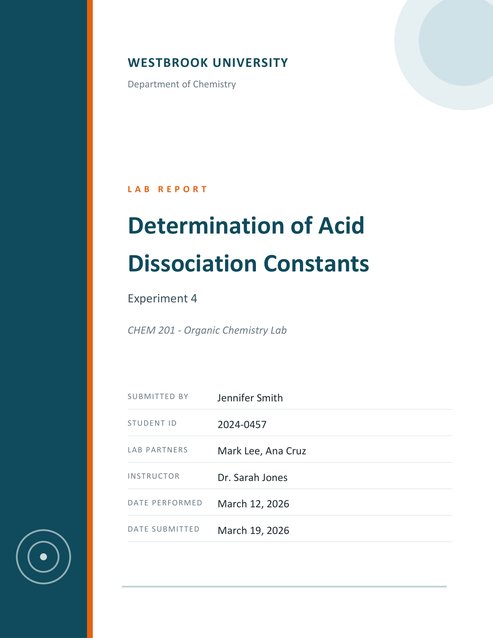
- School or university and department. Shown at the top of the page. Include the department when your institution has several science departments.
- Course name or code. For example “CHEM 201 – Organic Chemistry Lab”. Instructors who grade several sections rely on this to sort the reports.
- Lab report title. The experiment name, in large type. It is the one required field.
- Experiment number or subtitle. Use this for “Experiment 4”, a lab session number, or a short descriptive line.
- Your name and student ID. The ID helps when several students share a name.
- Lab partners. If you worked in a group, list everyone who took part in the experiment, even when only one person writes the report.
- Instructor or teaching assistant. The person who will grade the report.
- Date performed and date submitted. The first records when the experiment was run, which matters for the data; the second shows the report was handed in on time.
Tips for a better lab report cover
- Check the lab manual first. Some courses require a specific title format or extra fields. Follow those rules and use this template to present them cleanly.
- Write a descriptive title. “Determination of Acid Dissociation Constants” tells the reader far more than “Lab 4”. Keep the experiment number for the subtitle.
- Keep titles reasonably short. One or two lines of title look best. If your title is very long, shorten it and put the detail in the report itself.
- Be consistent with the report. Use the same spelling of names, the same course code and the same date style on the cover as in the rest of the document.
- Use full names. Write names the way they appear on the class roster so the report is credited to the right person.
- Proofread before you download. A typo in a name or a date is easy to miss on screen and very visible on a printed cover.
Common mistakes to avoid
- Leaving out the course code or section, so the report cannot be matched to a class list.
- Forgetting to list lab partners, which can look like a missing contribution later.
- Mixing up the date the experiment was performed with the date the report was submitted.
- Using a logo that is too small or low in quality. Upload the largest clear version you have.
- Adding decorations, images or extra text that your instructor did not ask for. A plain, well-organised cover is almost always preferred.
Who is this lab report cover for?
The template suits high-school and college students writing reports for chemistry, physics, biology, earth science and engineering labs, as well as teachers who want a consistent cover for a whole class. Because the layout is neutral, it also works for field studies, practical assessments and research summaries that follow a lab-report format.
Printing and saving your cover page
The PDF is sized for standard US Letter paper and needs no margin setup. Print it on white paper for the cleanest result; the dark side band uses a lot of ink, so choose a standard rather than a draft quality setting if your printer offers one. If you submit your report digitally, keep the cover as page one of your PDF or upload it together with your report file, and name the file clearly with your name and the experiment, for example “Smith_Experiment4_LabReport.pdf”.
Frequently asked questions
Is the lab report cover page free?
Yes. You can create and download as many lab report cover pages as you like for free.
Can I add my school logo?
Yes. Upload a logo image in the form and it appears in the top corner of the cover page. Make sure your school allows you to use it.
What does the Load sample data button do?
It fills the form with an example lab report so you can see the finished layout straight away. Replace any of the sample text with your own, or clear the fields you do not need.
Do I have to fill in every field?
No. Only the title is required. Any field you leave empty is simply left off the cover page.
Can I use it for physics, biology or engineering labs?
Yes. The design is subject-neutral, so it suits any laboratory course.
Can I edit the PDF afterwards?
The simplest way to change something is to return to the form, correct the details and download a new PDF. Your last entries are remembered during your visit.
Which paper size does it use?
US Letter in portrait orientation. Most printers scale it automatically if you print on A4 paper.
Does the template include the report itself?
No. It creates the cover page only. Place it in front of your own report, which should contain your introduction, method, results, discussion and conclusion.