

Create Christmas Advent Calendar
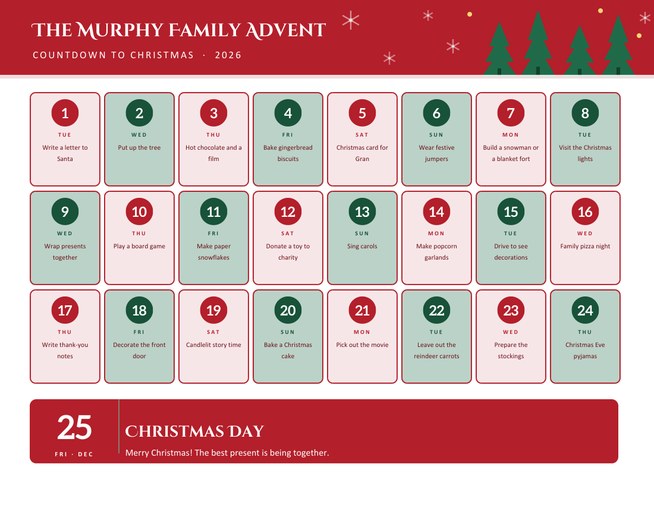
A festive landscape advent calendar with 24 numbered doors in three rows and a Christmas Day banner underneath. Type a small surprise or activity for every day and each one is printed on its own door, with the weekday for the year you choose.
Pick one of four colour themes, add your family’s name and a Christmas Day message, and download a Letter-size PDF to hang on the wall or pin on the fridge.
Fill in the information below
New here? Use the button above to fill in an example, then change it to your own details.
Rate this template
Used it? Tap a star. Honest ratings help others choose.
You May Also Like
Templates from other categories that people often use together with this one.
Other Similar Templates
More designs from the same collection, Free Printable Calendars and Planners. If this one is not quite what you need, one of these may be.


A countdown that does not have to be chocolate
Many families love the ritual of counting down to Christmas, but a shop-bought advent calendar fixes the surprise for you, and it is usually a sweet one. This template turns the countdown into something you design. Each of the 24 doors carries a short line you write yourself: bake gingerbread, write a card to Gran, watch the Christmas lights, give a toy to charity. Children get something to look forward to every morning, and the surprises can cost nothing at all.
Because the surprises are printed on the page, the calendar also works as a planning tool for adults. You can see the whole of December at once and spread the busy jobs, such as wrapping and shopping, across the month instead of leaving them all for the last weekend.
How to make your calendar
- Press “Load sample data” to see a finished example with 24 ideas.
- Choose the Christmas year. The weekday printed under each date is worked out for that year, so Monday the 1st becomes Tuesday the 1st when it should.
- Add a title, such as “The Murphy Family Advent” or “Room 4 Countdown”. It can be up to 32 characters.
- Write the daily surprises, one per line. The first line goes on door 1, the second on door 2 and so on up to door 24. A door with an empty line stays blank, so you can write it by hand or keep it a secret.
- Add a Christmas Day message of up to 90 characters, then preview and download.
What is on the page
- Twenty-four rounded doors in a grid of eight across and three down, alternating between two tints so the page looks lively but stays easy to read.
- A round number badge on every door, the weekday below it and your note underneath (about 45 characters fit comfortably on three short lines).
- A wide Christmas Day banner with a large 25 and your message.
- A header with your title, snowflakes and pine trees in the colours of your theme.
Four colour themes
Classic red and green is the traditional choice. Winter navy and ice suits a cooler, snowy look. Forest and gold feels warm and a little grown-up, and Berry and cream is soft and modern. All four are readable in greyscale if you print in black and white.
Ideas for the 24 surprises
- Together days: a board game evening, hot chocolate and a film, a walk to see the decorations, baking.
- Giving days: make a card, donate a toy, leave biscuits for a neighbour, write a thank-you note to a teacher.
- Making days: paper snowflakes, popcorn garlands, a gingerbread house, homemade gift tags.
- Little treats: a sticker, a new pair of festive socks, a joke to read at breakfast, a favourite song to sing.
- Calm days: candlelit story time, a quiet drawing hour, early bedtime on the last night.
Using the printed page
You can tick doors off with a pen each morning, cover them with sticky notes and peel one away every day, or cut the page into a card calendar with small flaps if you enjoy craft. For a classroom, print it, laminate it and have a different pupil reveal the day’s door each morning. The page is US Letter landscape, 11 by 8.5 inches; choose “fit to page” on A4 paper.
Questions people ask
Do the doors really open?
No. The doors are printed boxes, so you read the day’s surprise on the page. You can cover each door with a sticky note and peel it off on the day if you want the surprise kept hidden.
Can I use it for something other than Christmas?
The numbering runs from 1 to 24 and ends with a Christmas Day banner, but you can write any countdown on the doors, such as 24 days of revision or a family holiday countdown.
What if I do not fill in all 24 lines?
Doors without a line print with just the number and weekday, ready for you to write on by hand.
Does the calendar show the right weekdays?
Yes. The weekday under each number is calculated for the Christmas year you choose, including the weekday of Christmas Day.
Can I make one for each child?
Yes. Change the title and the surprises and download again. Many parents make a different one for each child.
What size is the page?
US Letter landscape, 11 by 8.5 inches, which fits on A4 with “fit to page” selected.