

Create Birthday and Anniversary Calendar
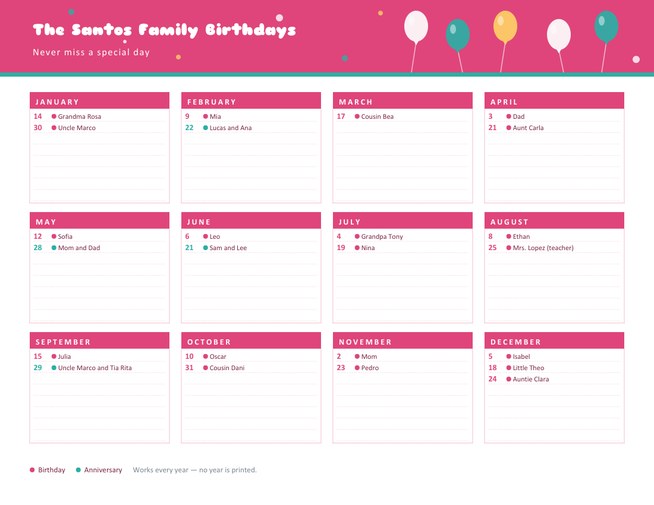
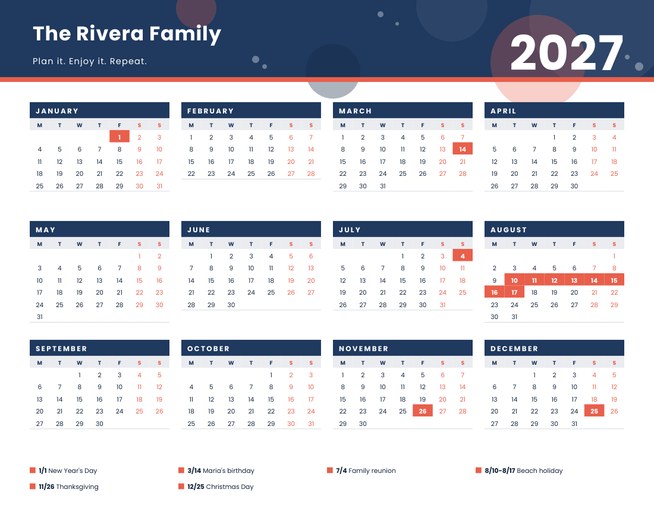
A perpetual birthday and anniversary calendar with twelve monthly cards on one landscape page. Type each date as month/day and a name, and every month lists its dates in order, with birthdays and anniversaries marked in two colours.
No year is printed, so the same calendar works every year. Choose a colour theme, add a title and download a Letter-size PDF.
Fill in the information below
New here? Use the button above to fill in an example, then change it to your own details.
Rate this template
Used it? Tap a star. Honest ratings help others choose.
You May Also Like
Templates from other categories that people often use together with this one.
Other Similar Templates
More designs from the same collection, Free Printable Calendars and Planners. If this one is not quite what you need, one of these may be.



One list that works every year
Most people keep birthdays in their heads, on scraps of paper or buried in a phone, and then forget one a year. A perpetual calendar solves that by not depending on the year at all. Birthdays and anniversaries repeat on the same day every year, so you write them down once, print one page and pin it up somewhere you walk past every day.
This template arranges the year as twelve monthly cards, three rows of four. Under each month the dates you entered are sorted by day, with a small dot colour showing whether the entry is a birthday or an anniversary.
Making the list
- Choose a title, for example “The Santos Family Birthdays” or “Team Birthdays”, and an optional subtitle.
- Pick a colour theme. Confetti pink and teal is party-like, sunshine orange and blue is cheerful, garden green and rose is gentle, and midnight and gold is smart.
- Type the dates, one per line, month first and then the day, then the name: 03/09 Mia, 06/21 Sam and Lee anniversary. You can enter up to eighty lines in any order.
- Preview and download. You can return to the form to add a forgotten date and print again.
How the calendar handles your entries
- Entries are sorted by day inside each month, whatever order you typed them in.
- A line that contains the word anniversary or wedding gets the second dot colour. If the line ends with the word anniversary (or wedding anniversary), that ending is dropped from the printed name, since the colour already says what it is, so “Sam and Lee anniversary” prints as “Sam and Lee”.
- Every other line is treated as a birthday.
- 29 February is accepted for people born on a leap day. Impossible dates, such as 02/30, are skipped.
- Each month shows up to eight lines. If a month has more than eight dates, the first seven are listed and the eighth line says how many are not shown, so you know to move some to another list. Names are shown up to about 28 characters.
- Empty lines are printed as faint dotted rules so you can add a new date by hand during the year.
Where to put it
- On the fridge or kitchen noticeboard, where everyone in the house can see it.
- Inside the front cover of a diary, folded to fit.
- In the staff room for a small team that likes to celebrate.
- In a classroom, so that pupils can see when each class birthday falls.
- In a club or church office for members’ birthdays and wedding anniversaries.
Remembering is about the next step
A calendar tells you a date is coming, but a card needs buying and posting before it. Once a month, look at the next month’s card and decide what to do for each person: send a message, post a card, book a table. If someone lives far away, write the date a week earlier in the margin so the card can arrive in time. Keep a small pack of blank cards beside the calendar so there is never an excuse.
A note on privacy
The calendar prints only the day and month, never the year of birth, which is kinder to anyone who prefers not to share their age and avoids publishing personal details on a page that visitors might see. It is sensible to leave out children’s full names if the page hangs somewhere visible to guests. The page is US Letter landscape; choose “fit to page” for A4.
Questions people ask
Does the calendar need updating every year?
No. Because only the day and month are printed, the same page works every year. Print a fresh copy when you add or change names.
How do I mark an anniversary?
Include the word anniversary or wedding on the line, for example “06/21 Sam and Lee anniversary”. The entry gets the second dot colour, and the closing word anniversary is removed from the printed name to save space.
What if more than eight people share a month?
The card shows the first seven dates in day order and the last line says how many more there are. You can print a second calendar for another group, such as friends or colleagues.
Can I add 29 February?
Yes. Enter 02/29 and it appears in February.
In which order should I type the dates?
Any order. They are sorted by day within each month when the page is made.
Can I add the year someone was born?
You can type it after the name, for example “03/09 Mia (turns 7)”, but it is not necessary and the calendar does not calculate ages.