

Create Work Shift Schedule
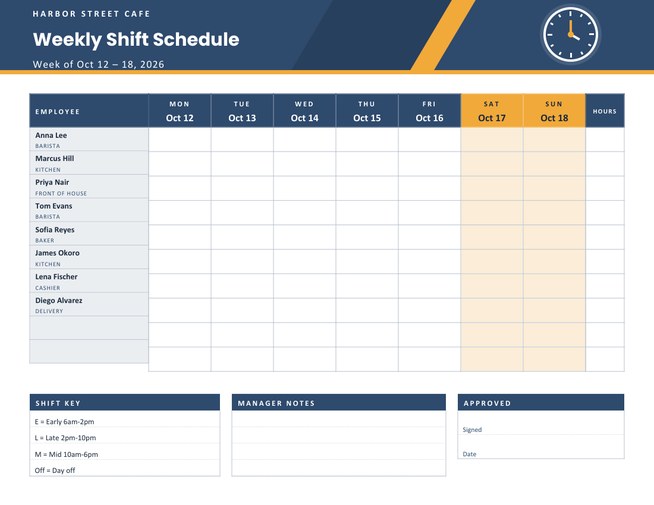
A landscape weekly shift schedule for small teams, with a row for each employee, a column for each day of the week, a total hours column, a shift key, manager notes and a signature box.
Type your staff names and roles, choose the week, add your business name and logo, and download a Letter-size PDF to post in the staff room.
Fill in the information below
New here? Use the button above to fill in an example, then change it to your own details.
Rate this template
Used it? Tap a star. Honest ratings help others choose.
You May Also Like
Templates from other categories that people often use together with this one.

Other Similar Templates
More designs from the same collection, Free Printable Calendars and Planners. If this one is not quite what you need, one of these may be.


A schedule everyone can read and nobody has to guess
In a cafe, a clinic, a shop or a small workshop, the weekly rota is the most checked page in the building. It needs to be clear, easy to alter in pencil and posted where everyone can see it. This template gives a team that page: employees down the left, the seven days of the week across the top and a large empty cell at each crossing, so you can write “9–5”, “Early”, “E” or “Off” with a pen.
Setting up the schedule
- Add your business or team name and a title such as “Weekly Shift Schedule” or “Kitchen Rota”. A logo can be uploaded to appear at the top left.
- Choose the week. Pick any date in the week and the schedule prints the seven dates, starting on Monday or Sunday as you choose.
- Choose 8, 10 or 12 staff rows. Fewer rows make taller cells for longer notes.
- Type the staff list, one person per line. Add a role after a dash, for example Anna Lee - Barista; the name is printed in bold and the role beneath it in small capitals.
- Write a shift key of up to four lines, such as “E = Early 6am-2pm” and “L = Late 2pm-10pm”, so short codes in the cells are understood by all.
What is on the page
- Employee column with each name and role.
- Seven day columns headed by the weekday and date, with Saturday and Sunday columns in the accent colour.
- Hours column at the right for each person’s weekly total.
- Shift key,manager notes and an approval box with signed and date lines at the foot of the page.
The day cells are deliberately left blank, so you can fill them by hand, change them at short notice and still have a tidy, readable page.
Making a fair rota
- Publish the schedule as early as you can. Staff plan childcare, study and second jobs around it.
- Rotate unpopular shifts, such as weekends and closing, instead of giving them to the same people.
- Leave a short gap between a late finish and an early start where possible.
- Check that each shift has the skills it needs, such as a keyholder or a first-aider.
- Write approved changes in the cell, initial them and note them in the manager notes, so there is one record.
Rules about working hours, breaks, overtime and how much notice you must give vary by country and by state or region. Please check the rules that apply to you; this page helps you lay out a rota, but it does not check that a schedule complies with the law.
Typical users
Cafes and restaurants, retail shops, salons and barbers, small clinics and pharmacies, care homes, delivery teams, cleaning crews, volunteer groups and school activity clubs. Team leaders in larger organisations also use a printed schedule as a back-up beside their scheduling software.
Printing and posting
The page is US Letter landscape. Print one master copy, post it where staff gather and keep a second copy for the manager. Laminating the sheet lets you use a dry-erase marker for changes during the week. Four colour themes are available: steel blue with amber, pine with gold, crimson with sky and graphite with mint. All of them keep high contrast between the header and the white writing cells, which helps when the page is read from a distance.
Questions people ask
Can I add staff roles?
Yes. Type the role after a dash on the same line as the name, for example “Marcus Hill - Kitchen”. It prints under the name.
How many employees fit on a page?
Up to twelve rows. If you need more, print a second schedule for another team or department.
Are the shift cells filled in automatically?
No. They are left blank on purpose so that you can pencil in shifts and change them as the week goes on.
What is the hours column for?
It is a blank column where you write each person’s total hours for the week.
Can I start the week on Sunday?
Yes. Use the “Week Starts On” list to choose Monday or Sunday.
Does the schedule check labour rules?
No. It is a layout tool. Check your local rules on hours, breaks and notice periods when you create a rota.