

Create Daily Appointment Book
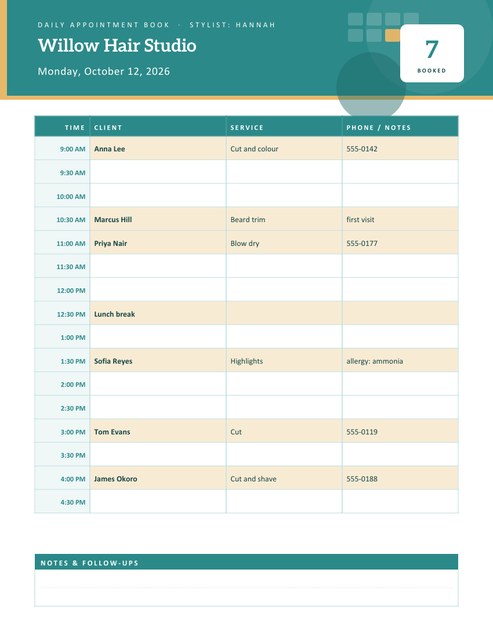
A portrait daily appointment book with a row for every time slot and columns for the client, the service and a phone number or note. Type your bookings with their start times and each one lands in the right row, with a count of how many are booked.
Set your opening hours and a 15, 30 or 60-minute slot, add your business name and logo, and download a Letter-size PDF.
Fill in the information below
New here? Use the button above to fill in an example, then change it to your own details.
Rate this template
Used it? Tap a star. Honest ratings help others choose.
You May Also Like
Templates from other categories that people often use together with this one.
Other Similar Templates
More designs from the same collection, Free Printable Calendars and Planners. If this one is not quite what you need, one of these may be.


A paper appointment book that fills itself in
Salons, clinics, tutors, driving instructors, mobile mechanics and home-based businesses often start with a paper diary because it is quick, cheap and works when the internet does not. The problem is the layout: a general-purpose diary has the wrong time slots and no room for the details you need, such as which service was booked and how to reach the client.
This template is a day sheet designed for appointments. The left column lists the time slots from your opening time to your last slot. Three columns to the right hold the client, the service and a phone number or note. You can type the bookings you already have and the page places them for you, then pencil in anything that arrives later.
Setting up the day
- Enter the business name and, if you have more than one person or room, the staff member or room name for this sheet.
- Choose the date. The full weekday and date appear in the header.
- Choose your opening hours: the first slot can start between 5 AM and noon and the last slot can end between 1 PM and 10 PM.
- Choose the slot length: 15 minutes for quick services, 30 minutes for most appointments or 60 minutes for longer sessions.
- Pick a 12-hour or 24-hour clock, a colour theme, and upload your logo if you like.
Typing the bookings
Each booking is one line: the start time and client name first, then the service and the phone number or note, separated by the | character.
9:00 Anna Lee | Cut and colour | 555-0142
The time can be written as 9, 9:30, 14:15 or 2 pm. A time without am or pm is treated as the afternoon if it falls before your opening time and the afternoon fits your schedule, so with a 9 AM opening, “3” becomes 3 PM. A booking goes into the slot that contains its start time, so a 10:40 appointment appears in the 10:30 slot of a 30-minute day. If two bookings share a slot they appear together in that row, separated by a slash. Bookings outside your opening hours are left out, which is a quick way to notice a typing error.
What the sheet shows
- A header with your business name, the staff or room line, the full date and a large Booked count.
- Time labels in a tinted column, rows with a pale colour when they contain a booking and white when they are free.
- A Notes & Follow-ups panel at the bottom for reminders such as “call back about the quote”.
The rows share the page height, so a short day with 60-minute slots has tall, roomy rows for handwriting, and a long day with 15-minute slots has compact ones.
Good habits for an appointment book
- Write the client’s phone number at the time you book, not later.
- Leave a spare slot or two for emergencies and overruns.
- Note preparation in the last column, such as “bring X-rays” or “patch test needed”.
- Print tomorrow’s sheet the evening before and use it to make reminder calls.
- Keep one sheet per person if several people take bookings, and merge them on a master page.
A note on client details
Names and phone numbers are personal information. Keep printed sheets out of sight of other clients, store them somewhere secure and shred them when you no longer need them. This page is a layout tool: it does not send reminders and it does not take online bookings. Do not enter sensitive details such as medical conditions unless you are allowed and equipped to keep them private.
Printing
The page is US Letter portrait. Four colour themes are available: spa teal with sand, rose with gold, navy with sky blue, and sage with amber. For A4 paper choose “fit to page”. A three-hole punch fits the sheets into a ring binder as a running diary.
Questions people ask
How does a booking find its time slot?
It goes into the slot that contains its start time. For example, with 30-minute slots from 9:00, a booking at 10:40 appears in the 10:30 row.
What slot lengths are available?
15, 30 or 60 minutes. The sheet holds up to 40 rows. If your opening hours and slot length would need more, the slot length is lengthened automatically (15 to 30 to 60 minutes) so everything still fits on one page.
What does the Booked number count?
It counts every booking line that fell inside your opening hours, including entries such as a lunch break if you typed them.
Can I print blank sheets?
Yes. Leave the bookings box empty and choose the date, hours and slot length to get a blank day sheet.
Does the sheet send reminders?
No. It is a printed page, so reminders have to be made by you. It does make it easy to see who to call tomorrow.
Can I add a logo?
Yes. Upload a PNG, JPG or SVG and it is placed in a white badge at the left of the header.