

Create Social Media Content Calendar
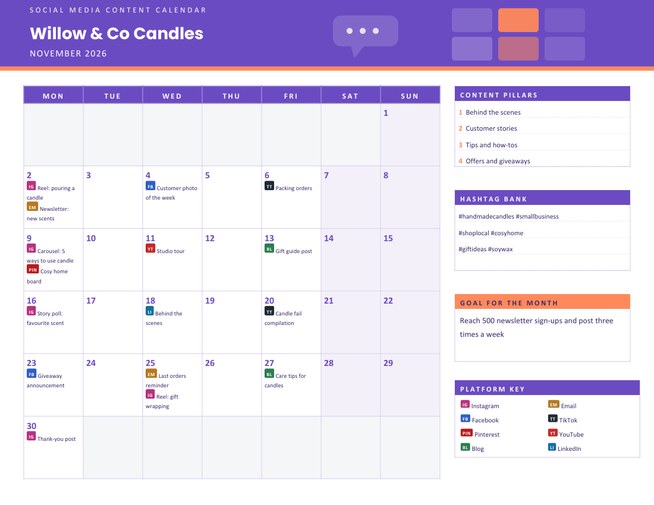
A landscape monthly content planner for small businesses, creators and clubs. Type your posts as “3 IG Reel: pouring a candle” and the platform code becomes a coloured tag in the day box, with a key of the platforms you use.
Side panels hold your content pillars, a hashtag bank and your goal for the month. Choose a colour theme and download a Letter-size PDF.
Fill in the information below
New here? Use the button above to fill in an example, then change it to your own details.
Rate this template
Used it? Tap a star. Honest ratings help others choose.
You May Also Like
Templates from other categories that people often use together with this one.
Other Similar Templates
More designs from the same collection, Free Printable Calendars and Planners. If this one is not quite what you need, one of these may be.


Plan the month, then post with a clear head
Posting on social media without a plan is tiring. Every morning you ask what to share, you check what you posted last week, and you often end up posting nothing. Creators and small businesses who plan a month ahead tend to post more regularly because the thinking has already been done. A content calendar is the page where that thinking lives: what goes out, on which platform, on which day.
This planner shows the month as a grid of day boxes. Posts appear inside the boxes with a small coloured tag that tells you the platform at a glance, so you can see how your week is balanced across channels.
Typing your posts
Write one post per line: the day of the month, a platform code, then your idea. For example 3 IG Reel: pouring a candle or 13 BL Gift guide post. The codes are:
- IG Instagram · FB Facebook · TT TikTok
- YT YouTube · LI LinkedIn · X X (Twitter)
- PIN Pinterest · EM Email · BL Blog
A line without a code is printed as plain text, which is useful for reminders such as “Order stock”. Each day box shows up to three posts, and each post is cut to about thirty characters, so keep the idea short and put the detail in your own notes. You can enter up to forty lines in total.
The side panels
- Content Pillars. Three or four themes you return to, such as behind the scenes, customer stories, tips and offers. Posting from a short list of pillars makes planning faster and gives your account a recognisable voice.
- Hashtag Bank. Up to four lines of hashtags you reuse, so they are at hand when you write a caption.
- Goal for the Month. One measurable sentence, for example “Reach 500 newsletter sign-ups and post three times a week”.
- Platform Key. Printed automatically with the platforms you actually used, in two columns.
Setting up the form
- Enter your brand or account name, then choose the month and year and the first day of the week.
- Choose a colour theme: violet with coral, coral with teal, ocean with amber, or graphite with mint.
- Type your posts, pillars, hashtags and goal. Use the “Load sample data” button to see a worked example for a candle shop.
How to build a month that is easy to keep
- Start with the fixed dates: product launches, sales, holidays and events that are already in your diary.
- Add one anchor post a week, such as a customer photo on Fridays, so the rhythm is predictable.
- Reuse a good idea across platforms. A short video can become a reel, a story and a blog image.
- Batch the work. Film, write and design several posts in one sitting, then schedule them.
- Leave gaps. Keep some days free for news and replies, and review the results at the end of the month.
Who it is for
Shop owners and market stallholders, freelancers and consultants, bloggers and YouTubers, charities and clubs, and anyone who runs an account for someone else. Agencies can print a calendar for a client, and students can use one to plan a campaign for a marketing assignment.
About the tags and printing
The platform tags use our own colours and plain letter codes; they are not the official logos or colours of any service, and this page is not connected to or endorsed by any of them. Use the planner with your scheduling tool of choice; it does not post anything for you. The page is US Letter landscape, and for A4 you can choose “fit to page”.
Questions people ask
What do the platform codes mean?
IG is Instagram, FB Facebook, TT TikTok, YT YouTube, LI LinkedIn, X for X (Twitter), PIN Pinterest, EM Email and BL Blog. The code turns into a coloured tag in the day box.
What if I use a platform that is not in the list?
Leave out the code and write the platform in the idea, for example “12 Podcast episode 4”. It is printed as plain text.
How many posts fit in one day?
Each day box shows up to three posts. All lines you enter are still used for the platform key.
Does the planner post for me?
No. It is a printed planning page. You still post or schedule through the apps you already use.
Can I plan several months?
Yes. Change the month and download again; your pillars, hashtags and goal stay in the form so you can update only what changes.
Is it suitable for a client?
Yes. Use the client’s brand as the account name and print a copy for their approval.