

Create 30-Day Habit Tracker
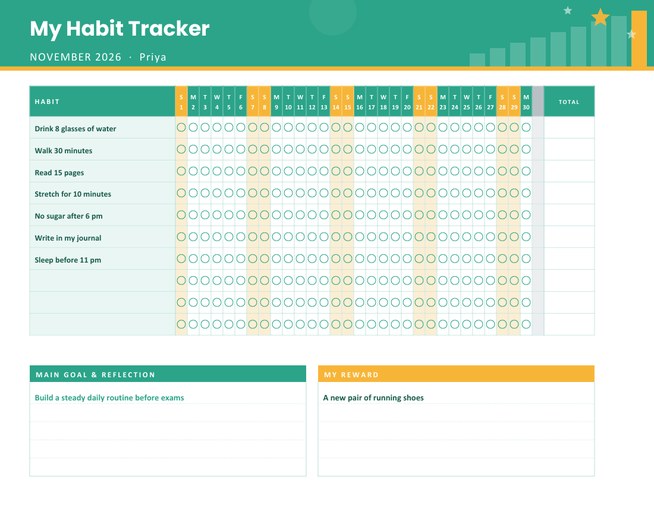
A landscape monthly habit tracker with a row for each habit and a small circle to colour in for every day of the month. Weekends are shaded, a total column counts your successes, and panels at the bottom hold your main goal and your reward.
Choose the month, the number of rows and a colour theme, type your habits and download a Letter-size PDF.
Fill in the information below
New here? Use the button above to fill in an example, then change it to your own details.
Rate this template
Used it? Tap a star. Honest ratings help others choose.
You May Also Like
Templates from other categories that people often use together with this one.

Other Similar Templates
More designs from the same collection, Free Printable Calendars and Planners. If this one is not quite what you need, one of these may be.


Small circles, big streaks
Most habits fail quietly. Nobody decides to stop reading, stretching or drinking water; the habit just fades because there is no signal that it has been missed. A tracker supplies that signal. Each day you colour in a circle for every habit you kept, and the chain of filled circles becomes something you do not want to break. Seeing a long streak is satisfying, and seeing a gap is a gentle prompt to start again tomorrow.
This tracker is a month on one page, with the dates across the top and your habits down the side.
Set up your month
- Choose the month and year. The grid has exactly the right number of days: 28 or 29 for February (leap years are handled), 30 or 31 for other months. Unused columns are shaded grey.
- Choose 8, 10 or 12 habit rows. Fewer rows make taller, roomier rows.
- Type your habits, one per line, up to twelve, each up to 40 characters. Empty rows stay blank so you can add habits by hand.
- Add a title and your name, a main goal for the month and a reward.
- Pick a colour theme: mint with marigold, sunrise with navy, violet with sunshine or ink with ember.
Reading the page
- Each column header shows the first letter of the weekday above the date, so you can see at once which days are weekends.
- Weekend columns are tinted so you notice if your routine slips on Saturdays and Sundays.
- The Total column at the right is empty for you to count your circles at the end of the month, or each week.
- The Main Goal & Reflection panel prints your goal in bold and leaves three lines for end-of-month thoughts.
- The My Reward panel is where you write what you will treat yourself to if you do well.
Choosing habits that stick
People tend to track too many things at once. Start with three to five habits that are specific and small enough to do on a bad day: “read 15 pages” instead of “read more”, “walk 30 minutes” instead of “get fit”. If a habit is a stretch, shrink it until you are sure you can do it every day, and make it bigger next month. Mix building habits (stretching, studying) with limiting habits (no sugar after 6 pm), but keep the wording positive where you can.
Who it is for
Students building study routines, runners and gym-goers logging sessions, people learning a language one lesson a day, anyone working on sleep, water or screen-time habits, and parents helping children keep up daily reading or chores. Teachers can print one per pupil for a class reading challenge.
How to keep it going
- Hang the page where you will see it every day, for example beside the kettle or the bathroom mirror.
- Fill the circles at the same time each day, such as after brushing your teeth.
- Do not aim for perfection. Missing one day matters far less than missing two in a row.
- At the end of the month, count the circles in the Total column and write what you learned in the reflection panel.
- Keep the finished sheets. Looking back at twelve months of habit pages is a quiet confidence boost.
Printing
The page is US Letter landscape. The circles are about nine points wide, large enough to colour in with a pen or fill with a sticker. The grid prints best at 100 percent scale; on A4, choose “fit to page”.
Questions people ask
Does it work for February and leap years?
Yes. The grid shows 28 or 29 days for February, and any extra columns are shaded grey.
How many habits can I track?
Up to twelve rows. You can choose 8, 10 or 12 rows in the form.
What should the Total column be used for?
Count the filled circles in each row at the end of the month, or every week, to see how consistent you were.
Can I start a tracker mid-month?
Yes. Choose the month and simply begin colouring from the day you start.
Can children use it?
Yes, with an adult’s help to choose a few simple habits such as reading, tidying up or brushing teeth.
Can I leave the habits blank?
Yes. Empty rows stay blank so you can write your own habits with a pen.