

Create Weekly Meal Planner
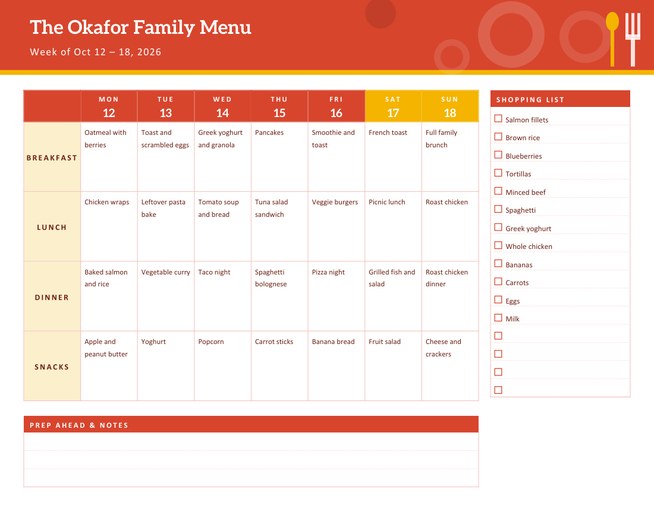
A landscape weekly meal planner with a colourful menu grid, a shopping list with tick boxes and a prep-ahead notes panel. Type the dishes for each meal and each lands under the right day, or leave the boxes empty and write by hand.
Show three or four meals a day, rename the meals if you like, and download a Letter-size PDF for the kitchen wall.
Fill in the information below
New here? Use the button above to fill in an example, then change it to your own details.
Rate this template
Used it? Tap a star. Honest ratings help others choose.
You May Also Like
Templates from other categories that people often use together with this one.
Other Similar Templates
More designs from the same collection, Free Printable Calendars and Planners. If this one is not quite what you need, one of these may be.


Decide once, shop once, stress less
Most households make the same decision about dinner every evening, usually when everyone is already hungry. A weekly meal plan moves that decision to one calm moment: you choose the meals, check what is already in the cupboard, write one shopping list and avoid the extra trip to the shop. People who plan meals tend to waste less food, spend less on takeaways and find it easier to eat the way they intended.
This planner is the page for that moment. The menu grid takes most of the sheet, the shopping list sits at the right and a prep panel across the bottom reminds you what to defrost, soak or marinate ahead of time.
How to set up the week
- Choose the week. Pick any date and the seven days around it are printed with their dates. Start the week on Monday or Sunday.
- Give the planner a title, for example “The Okafor Family Menu”. The week’s dates appear beneath it.
- Choose three or four meals a day. Four adds a snacks row.
- Type the dishes. Each meal has its own box: write up to seven dishes, one per line, in day order. The first line goes to the first day of the week. Leave a box empty and that row stays blank for writing by hand.
- Write the shopping list, up to sixteen items, one per line.
Rename the meals
Click the pencil beside a meal’s name in the form to change what is printed. Breakfast can become Brunch, Lunch can become Packed lunch, Dinner can become Supper, and Snacks can become Dessert. This is handy for households that eat differently on different days or follow a particular routine, such as a fasting schedule or a shift pattern.
Planning ideas that make the grid easier
- Theme nights. Pasta Monday, taco Tuesday and pizza Friday cut down the thinking.
- Cook once, eat twice. Plan a roast on Sunday and use the leftovers in Monday’s lunch.
- Check the calendar first. Put quick meals on the evenings with clubs or late meetings.
- Keep a short list of reliable favourites that everyone eats, and add one new recipe a week.
- Look in the fridge before you write the list, and only buy what you do not have.
Who it is for
Families feeding children with different tastes, students sharing a flat and a food budget, people following a diet plan, anyone cooking in bulk on weekends, and care workers or carers who plan meals for another person. It also works as a planner for a small catering business or a school lunch club if you rename the rows.
The shopping list and prep panel
The shopping list has sixteen lines with tick boxes. Group items in the order you walk through the shop (fruit and vegetables, dairy, tins, frozen) to save time. The panel across the bottom, Prep Ahead & Notes, is for jobs such as “take chicken out of the freezer Tuesday night” or “make double sauce on Sunday”. It is left blank for handwriting.
Colours and paper
Four themes are available: tomato with sunflower, basil with mango, blueberry with honey and citrus with teal. The page is US Letter landscape. Print on regular paper and stick it to the fridge with a magnet, or print on card and slip it into a clear sleeve so it can be wiped and reused with a dry-erase pen.
Questions people ask
Can I plan only three meals a day?
Yes. Choose “3” in the Meals Per Day list and the snacks row disappears, giving the other rows more space.
How do the dishes match the days?
The first line in a box is placed under the first day of the week, the second under the next day, and so on, up to seven.
Can I rename Breakfast, Lunch and Dinner?
Yes. Use the pencil icon beside each meal name in the form and the new name is printed on the planner.
What if I do not want to type anything?
Leave the boxes empty. The grid prints blank, ready for pen or pencil.
Does it include recipes?
No. It is a planning page, so you write the dish names and keep recipes wherever you already store them.
Is there room for a budget?
The notes panel at the bottom can hold a weekly budget or a total, written in by hand.