

Create Pantry Inventory List
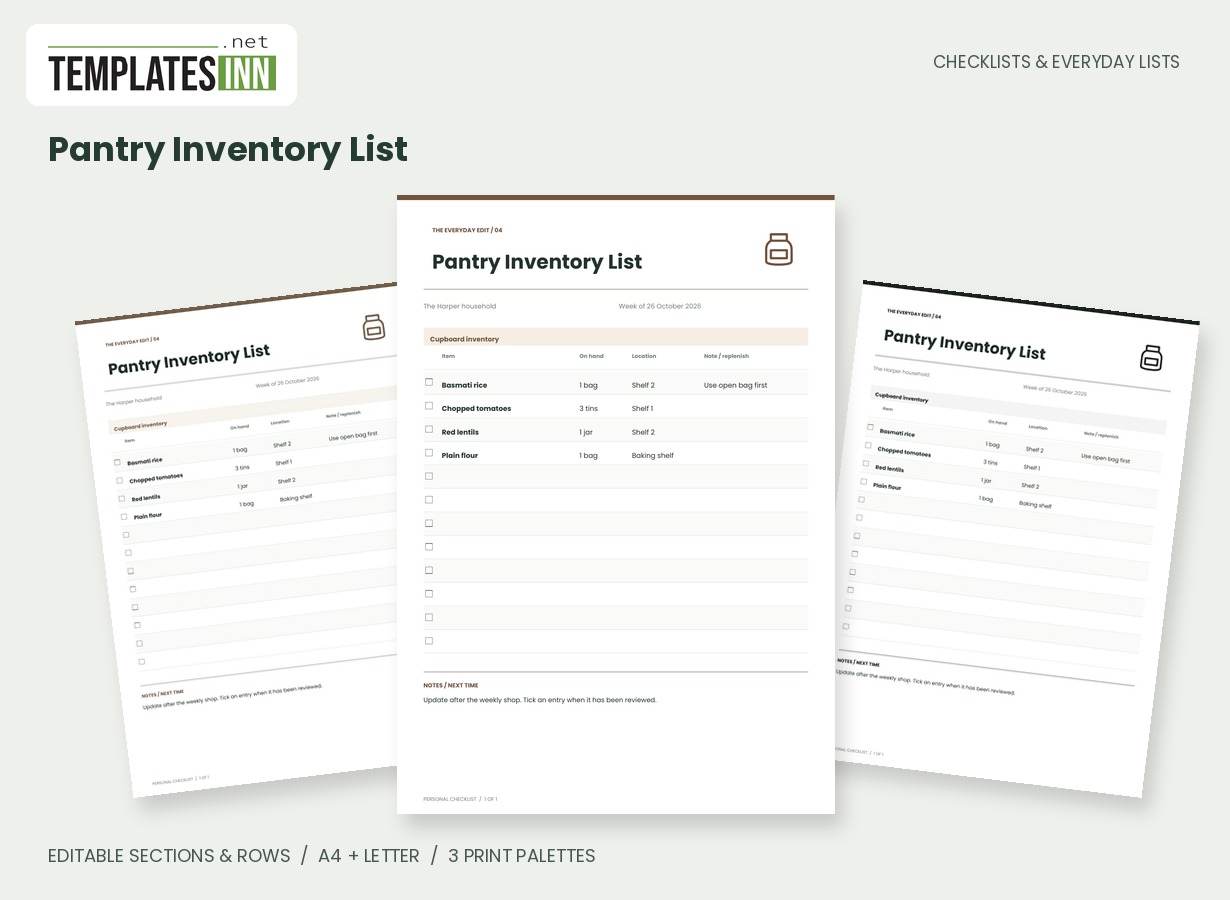
A pantry stock sheet for quantities, shelf locations and replenishment notes, with an uncluttered inventory table.
A pantry inventory gives the contents of a cupboard a place outside the cupboard. Record what is on hand, where it sits and a useful replenishment note, then keep the record current enough to consult before writing the next shopping list.
Fill in the information below
New here? Use the button above to fill in an example, then change it to your own details.
Rate this template
Used it? Tap a star. Honest ratings help others choose.
You May Also Like
Templates from other categories that people often use together with this one.


Other Similar Templates
More designs from the same collection, Checklists & Everyday Lists. If this one is not quite what you need, one of these may be.
Choose a scope you can actually maintain
Start with a shelf, a food category or the whole pantry only if the list will remain manageable. Use recognisable item names and quantities that describe your storage: one open bag and one spare is often clearer than an unexplained two. The location column helps when supplies are divided between cupboards or when another person needs to find an ingredient. You do not need to record every tiny change to make the sheet useful, but you should choose a review routine that keeps the numbers from becoming guesses.
Make the replenishment note do a specific job
A note can identify the open packet to finish first, a preferred storage place or an item to consider for the next shop. It is not an automatically generated buying instruction. Review the physical contents before transferring a note onto a grocery list. If an item changes location, update that column rather than adding a duplicate row and leaving the old entry in place. Keep different pack sizes distinguishable when they matter to the quantity. The table is a visible household record, not a barcode stock system or a source of food-storage advice.
Keep checking and using the inventory connected
Put the finished sheet somewhere practical for the person planning meals or shopping. A list hidden in a folder is less useful if nobody checks it before buying another packet. Use ticks to mark reviewed entries if that convention suits your household, and add the review date in the page period or notes. When the table becomes crowded, generate a fresh copy with the current rows instead of making a wall of crossings-out. Blank rows remain available for additions made by hand between printouts.
Starting entries for your pantry inventory list
- Rice / one open bag / shelf two / check before buying more.
- Tinned tomatoes / three tins / shelf one / review at next shop.
- Flour / one bag / baking shelf / keep the exact item name clear.
Before you use the finished page
- Decide which shelves the page covers.
- Write quantities in units your household understands.
- Record a useful location for each item.
- Remove duplicates when something moves.
- Add a review date so old counts are recognisable.
Make the layout your own
Use Load sample data for editable example entries, or begin with blank lines for handwriting. You can rename the page, add a name and period, edit section headings, and add or remove rows. The editor supports up to eight sections and eighty rows. Ticked items are printed as complete; blank boxes remain available for a pen. Short entries keep the page comfortable to read, while longer lists continue onto additional pages with repeated headings.
Print a copy you will actually use
Choose A4 or US Letter before generating the PDF, then use the matching paper in your printer. Print at Actual size or 100 percent. The signature palette gives this design its own character; soft neutral and black-and-white options are available for a quieter or lower-ink print. Preview the names, column contents and page breaks before making several copies. The website logo appears on browsing previews only, and your printable checklist has no TemplatesInn watermark.
Questions about this pantry inventory list
Does the list update when I use an ingredient?
No. Update quantities yourself in the editor or on the printed page. The PDF does not connect to purchases, detect cupboard contents or subtract food as it is used.
Can I track more than one cupboard?
Yes. Use the location column for different shelves or cupboards, or create separate editable sections. Choose the arrangement that makes your household's stock easiest to review.
Explore related practical pages in the Checklists & Everyday Lists collection. For date-based planning, see our Calendars & Planners.